![]() ![]() |
|
|||||||
| Register | Gallery | FAQ | Members List | Social Groups | Calendar | Forum Home | Search | Today's Posts | Mark Forums Read |
| Site Sponsors |
![]() |
|
|
LinkBack | Thread Tools | Display Modes |
|
|
#1 |
|
Sr. Administrator
|
Guy, Uwe and I were discussing a way to have some fun learning and sharing with the D800 and Uwe suggested something he used to do on his DOP site -- have a sort of contest where people can all work on the same raw file and share results, thus all learning about how to best process a new camera's images for themselves. So here we are!
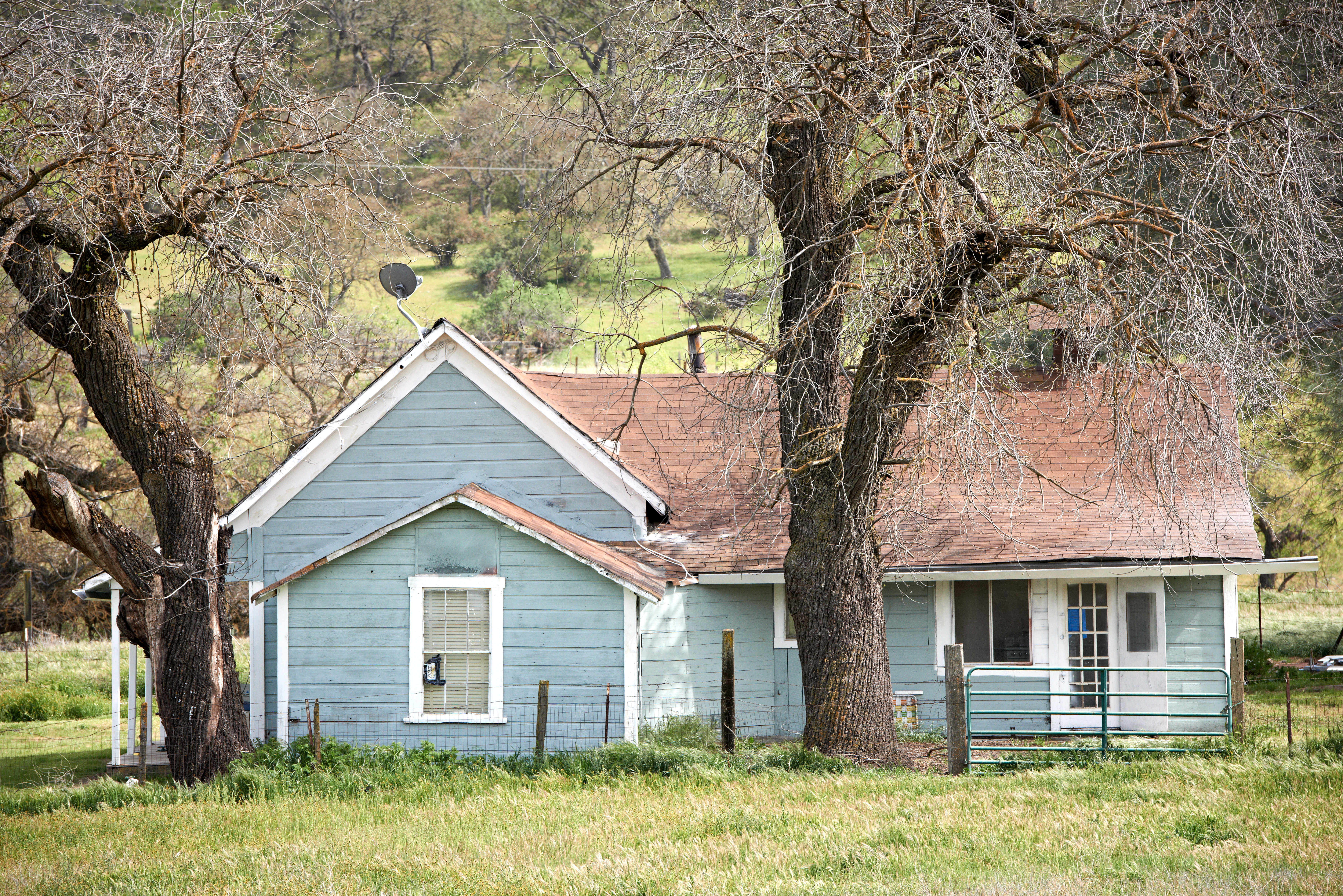
The concept is simply to share how you work up a file from start to finish, and posting a final result along with some crops. Here is a raw NEF that Uwe has provided. Click on the link, then navigate to the second file titled, "1204D800_0479_RanchHouse_70_200mm_VRII.NEF.zip," click on it and it should download. (Depending on browser you may need to do a right-click and save-as): Index of /getdpi Once you have the file, work it up however you like, just keep notes so you can share them with the group. I will be posting my results after a few days of results get posted, but my process will likely be converting the raw with C1 using standard tools as well as the advanced color editor, then outputting to CS5 for some localized editing, crops, web sizing and possibly additional output sharpening. Be sure to post crops of a detailed area for sharpness and/or color comparisons. This is not a contest, but rather a shared learning experience, so nothing to win other than having some fun with your friends online! Here is an "as shot" web version of the image you will be working on, nothing done to it other than a quick direct C1 web jpeg so you can see it here: ![]() Let the games begin!
__________________
Jack ➥ Guy and Jack's Upcoming Workshops "When bankers get together for dinner, they discuss Art. When artists get together for dinner, they discuss money." -- Oscar Wilde |
|
|
|
|
|
#2 |
|
Member
|
Re: Processing Challenge: Nikon D800 file
![]() ![]() Processed in C1, changing the gamma level to about -0.23, added a mild contrast curve. Ran CA analysis just in case. Rotated by eye. All else at defaults. Opened in PS. Copied bg layer, set it to overlay at 23%/stamped visible to top layer/added B&W adj. layer in Luminosity blend mode with the following values: Red: -9 Yellow: 12 Green: 85 Cyan: 25 Blue: -74 Magenta: 28 Cloned out the wires and dish and a few bright random bits on and near the roof. C1 applied default sharpening, I really like the look of it without any further sharpening at any point so I left it. All that detail doesn't leave me wanting. Last edited by danielmoore; 30th April 2012 at 11:23. Reason: added 100% view |
|
|
|
|
|
#3 |
|
Senior Member
|
Re: Processing Challenge: Nikon D800 file
Processing steps:
1. Used Nikon's NEF plugin for Windows to generate a 48-bit TIFF. 2. Wrote my own photo editing software. 3. Tweaked contrast and brightness. 4. Used polarizer filter to tweak sunlight, bring out flowers in foreground, and lichen on trees. 5. For some more texture in the foreground grass and flowers, added a masked layer with a slight contrast boost. 6. Sharpened at full resolution, radius 0.1 pixels at 300%. (This doesn't show in the final downscaled image.) 7. For the B/W version, added a B/W conversion filter with a dark red filter. Also increased overall contrast and pulled down shadows for deep density in tree bark. (Still haven't figured out how to embed images rather than thumbnails, sorry about that.) |
|
|
|
|
|
#4 |
|
Administrator & Instructor
|
Re: Processing Challenge: Nikon D800 file
Lars email me I will put in gallery guy at GetDPI.com. Same for anyone else if you can't figure that out make your post on what you have done than. E- mail me your image 1200 pixels wide I will put in gallery and add the BBC code in your post. I can edit anything as a admin
__________________
Photography is all about experimentation and without it you will never learn art. www.guymancusophotography.com |
|
|
|
|
|
#5 |
|
Contributing Editor
Join Date: Dec 2009
Location: Germany
Posts: 3,687
|
Re: Processing Challenge: Nikon D800 file
Lars, I like the B&W version.
__________________
Uwe Steinmueller ------------------- Editor&Owner of Digital Outback Photo http://www.outbackphoto.com |
|
|
|
|
|
#6 |
|
Sr. Administrator
|
Re: Processing Challenge: Nikon D800 file
Nice job Dan!
__________________
Jack ➥ Guy and Jack's Upcoming Workshops "When bankers get together for dinner, they discuss Art. When artists get together for dinner, they discuss money." -- Oscar Wilde |
|
|
|
|
|
#7 | |
|
Sr. Administrator
|
Re: Processing Challenge: Nikon D800 file
Quote:
Lars, your images look very good too, but it would be nice to see some crops -- Everybody has an automatic gallery here you can upload files to. Go to your gallery, simply hit the "upload" button, and follow the dialog. Once uploaded, click on the thumb, and you see a table with a link already for embedding into the thread. Here's a link to your gallery and you already have some images in it -- click on one and you will see the code links underneath: Regular Member Gallery - GetDPI Image Gallery PS: How long did your processing step #2 take? ![]() ![]()
__________________
Jack ➥ Guy and Jack's Upcoming Workshops "When bankers get together for dinner, they discuss Art. When artists get together for dinner, they discuss money." -- Oscar Wilde |
|
|
|
|
|
|
#9 |
|
Senior Member
|
Re: Processing Challenge: Nikon D800 file
|
|
|
|
|
|
#10 |
|
Member
|
Re: Processing Challenge: Nikon D800 file
Steps (all work in PS):
1.Straightened using ruler tool 2.Set white and black point in Levels layer 3.Made a Curves layer and changed blending mode to Multiply, set Opacity to 50%, then inverted image. Used the brush tool to burn in the grass below the house at 100%. Reduced the brush to 50% and burned in the top and sides. 4.Created a Selective Color layer and moved the black slider in Red to 100% 5.Sharpened using a Dan Margulis action Mr.Gale ![]() Crop at 100% ![]()
|
|
|
|
|
|
#11 |
|
Senior Member
Join Date: Jun 2010
Location: EU
Posts: 295
|
Re: Processing Challenge: Nikon D800 file
This will be an interesting thread to follow, to see what kind of PP people do. I won't be contributing due to the lack of skills and advance software, but just gave a try to see how well my Aperture handles the files. Boy, aren't they resource heavy! Opening that one single image and applying so PP made my 2011 MacBook Pro with 4 GB drop to its knees!
|
|
|
|
|
|
#12 |
|
Senior Member
|
Re: Processing Challenge: Nikon D800 file
Hi Jack
regarding the fact that I am a bit biased with TS I did a somewhat different version....... ![]() It´s first(!!!) processed with OnOne´s Focal Point 2 (opens the Nef instantly !) 2 focuspoints, a large one,see house, a small one see left edge tree. Settings were 11 blade aperture, widest feather (100 %) and some more. Then saved as 16 bit tiff opened in Photoshop CS6 Beta, rotated, removed powerline and satelite dish, some manual burn on shadows, a bit + saturation on roof and blue fassade, unsharp mask on details. See full and crop here: ![]() ![]() Have fun - this thread is a good idea - get creative folks ! Stefan
__________________
because photography is more than technology - and " as we have done this all the time " www.hcam.de www. hartblei.de www.spectralize.com Last edited by Stefan Steib; 1st May 2012 at 09:27. Reason: made it a bit darker |
|
|
|
|
|
#13 |
|
Senior Subscriber Member
|
Processing Challenge: Nikon D800 file
If I were to sell that house and this single picture was all I had, I would keep the pastel colors and the lack of contrast, add some vignetting and more or less leave it at that. Plus of course straightened and also sharpened a bit. My home is my castle, and a dream house needs a dreamy look, something like this ![]() |
|
|
|
|
|
#14 |
|
Contributing Editor
Join Date: Dec 2009
Location: Germany
Posts: 3,687
|
Re: Processing Challenge: Nikon D800 file
>My home is my castle
And you even have a satellite dish :-)
__________________
Uwe Steinmueller ------------------- Editor&Owner of Digital Outback Photo http://www.outbackphoto.com |
|
|
|
|
|
#15 |
|
Senior Subscriber Member
|
Processing Challenge: Nikon D800 file
|
|
|
|
|
|
#16 |
|
Contributing Editor
Join Date: Dec 2009
Location: Germany
Posts: 3,687
|
Re: Processing Challenge: Nikon D800 file
For me the first version is to bright. But as you said it may sell (more uplifting :-).
__________________
Uwe Steinmueller ------------------- Editor&Owner of Digital Outback Photo http://www.outbackphoto.com |
|
|
|
|
|
#17 |
|
Senior Subscriber Member
|
Processing Challenge: Nikon D800 file
Yup, in Real Estate business we always leave all items untouched - if they add to the value. And, as you probably know, in Real Estate business we never manipulate, only optimize ![]() Besides I cannot find those darn clone tools in my RAW converters ... |
|
|
|
|
|
#18 |
|
Contributing Editor
Join Date: Dec 2009
Location: Germany
Posts: 3,687
|
Re: Processing Challenge: Nikon D800 file
What you don't see is that we have also mouton view here :-).
Actually this house is at one of the most beautiful roads we know (Hwy 25 with lovely oak hills). Same property: ![]() This is a shot 180 degrees back: ![]() 1 mile South: ![]() Now for sure it sells.
__________________
Uwe Steinmueller ------------------- Editor&Owner of Digital Outback Photo http://www.outbackphoto.com |
|
|
|
|
|
#20 |
|
Subscriber and Workshop Member
Join Date: Dec 2007
Posts: 1,646
|
Re: Processing Challenge: Nikon D800 file
Here is a short try with RPP -> LR4 as TIF -> PS for levels crop and sizing...
![]() And a couple of crops Top Left ![]() Mid Bottom Right ![]() Bob |
|
|
|
|
|
#21 |
|
Subscriber and Workshop Member
Join Date: Dec 2007
Posts: 1,646
|
Re: Processing Challenge: Nikon D800 file
So on the above:
RPP Film Simulation Curve with slight increase in exposure, contrast and local contrast...minimal black point adjustment...decreased what seemed to be a slight magenta cast in the trees/roof. LR Temp +4 Contrast +8 Shadows/Blacks -6/-8 Clarity/Vibrance +4 Minimally Sharpened with small radius, detail and edge mask 24/0.7/64/22 Rotate 1.8 PS Levels adjustment to slightly darken mid tones 0.97 Crop 2x3 format deleting Left Sided fence but maximum size otherwise. Enough already. Bob |
|
|
|
|
|
#22 |
|
Member
|
Re: Processing Challenge: Nikon D800 file
Opened in LR4. Used adjustment brush on grass to reduce exposure, adjusted highlights then sent to OnOne Perfect Effects. There I made slight local contrast adjustment using the Tone Enhancer sliders. Sent to Photoshop to crop, straighten, some burn and dodge including burning the lower right corner of the roof, then converted to black and white in Silver Effects Pro 2.
|
|
|
|
|
|
#23 |
|
Subscriber and Workshop Member
Join Date: Dec 2007
Posts: 1,646
|
Re: Processing Challenge: Nikon D800 file
So here is a NIK SEFEX Conversion to BW
![]() And were I to print: This is BW Conversion with 24% opacity ![]() Bob |
|
|
|
|
|
#24 |
|
New Member
Join Date: May 2012
Posts: 1
|
Re: Processing Challenge: Nikon D800 file
New guy here. I appreciate you allowing me to play along.
![]() ![]() ![]() Edited in Lightroom 4. Camera neutral, rotate +1.4, sharpening 25, radius 0.7, Luminance NR 20, exposure -19, contrast +60, highlights -100, shadows +75, blacks -20, clarity +80, vibrance +10, Curves adjustments, and color adjustments. Some light brush work burning and local sharpening. I hope I didn't butcher this up too bad. |
|
|
|
|
|
#25 |
|
Contributing Editor
Join Date: Dec 2009
Location: Germany
Posts: 3,687
|
Re: Processing Challenge: Nikon D800 file
Bob, can you share the Silver Efex Preset? SEP 2?
__________________
Uwe Steinmueller ------------------- Editor&Owner of Digital Outback Photo http://www.outbackphoto.com |
|
|
|
|
|
#26 |
|
Subscriber and Workshop Member
Join Date: Dec 2007
Posts: 1,646
|
Re: Processing Challenge: Nikon D800 file
No preset...cook to desired temp....
This was a bit of increase in exposure and contrast...yellow filter at about 60% strength. I then apply the appropriate Film type depending upon the file...this was Kodak Pan 32 X ... no change in grain or contrast curve... Applied a tone of selenium #4 but decreased strength to 12.... Vignette of -4 Flatten and then adjust contrast and curves to desired affect. Every file is a bit different so no saved presets...just work it to desired level. Hope this helps. Bob Last edited by docmoore; 1st May 2012 at 16:19. |
|
|
|
|
|
#27 |
|
Contributing Editor
Join Date: Dec 2009
Location: Germany
Posts: 3,687
|
Re: Processing Challenge: Nikon D800 file
Bob, thanks.
__________________
Uwe Steinmueller ------------------- Editor&Owner of Digital Outback Photo http://www.outbackphoto.com |
|
|
|
|
|
#28 |
|
Subscriber and Workshop Member
Join Date: Dec 2007
Posts: 1,646
|
Re: Processing Challenge: Nikon D800 file
Uwe,
Love your site and pics...used to drive Pacheco Pass between Fresno and Monterey ... 18 years worth of looking at the Oaks on the hills near Hollister...brings back great memories. On the SEFEX...I usually use Coffee or Selenium tones at low levels...then contrast and levels to effect. Bob |
|
|
|
|
|
#29 |
|
Senior Member
Join Date: May 2009
Location: Marseille, FRANCE
Posts: 652
|
Re: Processing Challenge: Nikon D800 file
Not impress by the file potential... and quickly process
Process in C1 alignement tool curve hight contrast film Color temp underexpose highlight recovery + clarity + luminosity... but not enough... i've didn't process it on my main computer and Eizo screen... but i'm not use to DSLR files anymore, i've spend 3 years with only leaf files ! |
|
|
|
|
|
#30 |
|
Senior Member
Join Date: Dec 2009
Posts: 273
|
Re: Processing Challenge: Nikon D800 file
You can also use the Photoshop CS6 trial and the camera raw plugin 6.7 to open the D800 raw files...
|
|
|
|
|
|
#31 |
|
Senior Member
|
Re: Processing Challenge: Nikon D800 file
A fun challenge
. Here is my take. Processed entirely in C1 6.4, output resize in CS5:Exposure up: 0.2 Levels Black point: 5 Levels White point: 249 Levels Midtone point: -0.35 Curve: "Mid tone - darker" preset Rotation: 1.37 Sharpening: 250/0.6/2.0 B/W conversion - Color sensitivity: Yellow: -44 Green: -44 Cyan: -80 Blue: -80 Split Tones: Blue - Brown 1 Resized in CS5 with Jack's Web action (Over 20 MB - 1200) ![]() 100% crop
|
|
|
|
|
|
#32 | |
|
Senior Member
|
Re: Processing Challenge: Nikon D800 file
I didn't understand the light in this image until I opened it. Processed in ARC. Used curve adjustment, sharping at 1 pixel at 50, and some touches in hue/saturation/luminance panel giving a little more saturation to red/orange and green with changes to luminance in the greens. And then a touch of sharpening in photoshop.
Quote:
|
|
|
|
|
|
|
#33 |
|
Member
|
Re: Processing Challenge: Nikon D800 file
Really interesting to see the various ways the image is being processed by everyone.
My color version opened in ACR 6.7 Sent to OnOne Perfect Effects. Used the Tone Enhancer to enhance detail. Added presets and painted in or out, with masking brush, to accomplish desired effect. Sorry I cannot provide more detail on workflow used. I went through a whole lot of trial and error without taking notes. Sent to Photoshop. Cropped and Straightened. Burned and dodged. Adjusted color, tonality, contrast and saturation through layer masking and brushing in where needed. Again, no notes and I can't remember all the steps. ![]()
|
|
|
|
|
|
#34 |
|
Senior Member
Join Date: Dec 2007
Posts: 1,499
|
Re: Processing Challenge: Nikon D800 file
Fun challenge! Here's my 2-minute version:
![]() Steps:
|
|
|
|
|
|
#35 |
|
Contributing Editor
Join Date: Dec 2009
Location: Germany
Posts: 3,687
|
Re: Processing Challenge: Nikon D800 file
Amin, you may also remove some CA?
__________________
Uwe Steinmueller ------------------- Editor&Owner of Digital Outback Photo http://www.outbackphoto.com |
|
|
|
|
|
#36 |
|
Senior Member
Join Date: Dec 2007
Posts: 1,499
|
Re: Processing Challenge: Nikon D800 file
Uwe, I didn't see much CA. Guess I missed it.
|
|
|
|
|
|
#37 |
|
Contributing Editor
Join Date: Dec 2009
Location: Germany
Posts: 3,687
|
Re: Processing Challenge: Nikon D800 file
You magnified the roof. I think that green is CA, right?
__________________
Uwe Steinmueller ------------------- Editor&Owner of Digital Outback Photo http://www.outbackphoto.com |
|
|
|
|
|
#39 |
|
Contributing Editor
Join Date: Dec 2009
Location: Germany
Posts: 3,687
|
Re: Processing Challenge: Nikon D800 file
>And just for fun, the drought/fall look.
Funky look.
__________________
Uwe Steinmueller ------------------- Editor&Owner of Digital Outback Photo http://www.outbackphoto.com |
|
|
|
|
|
#40 |
|
Senior Member
|
Re: Processing Challenge: Nikon D800 file
|
|
|
|
|
|
#41 |
|
Contributing Editor
Join Date: Dec 2009
Location: Germany
Posts: 3,687
|
Re: Processing Challenge: Nikon D800 file
>Converted to Lab color space and then the A channel is inverted in curves.
Thanks for sharing, not for me :-)
__________________
Uwe Steinmueller ------------------- Editor&Owner of Digital Outback Photo http://www.outbackphoto.com |
|
|
|
|
|
#42 |
|
Senior Member
Join Date: Dec 2007
Posts: 1,499
|
Re: Processing Challenge: Nikon D800 file
|
|
|
|
|
|
#43 |
|
Senior Member
|
Re: Processing Challenge: Nikon D800 file
I have just started working in Lab and it is more than just the weird and whacky. It can get you out of some tricky mixed lighting situations fairly easily. Not a great image, but illustrative.
|
|
|
|
|
|
#44 |
|
Subscriber Member
Join Date: Jan 2008
Location: South of England
Posts: 1,814
|
Re: Processing Challenge: Nikon D800 file
I couldn't resist... so I thought, well, it's very gray here right now and I'd love to be in warm sunny California, let's do a little bright fantasy.
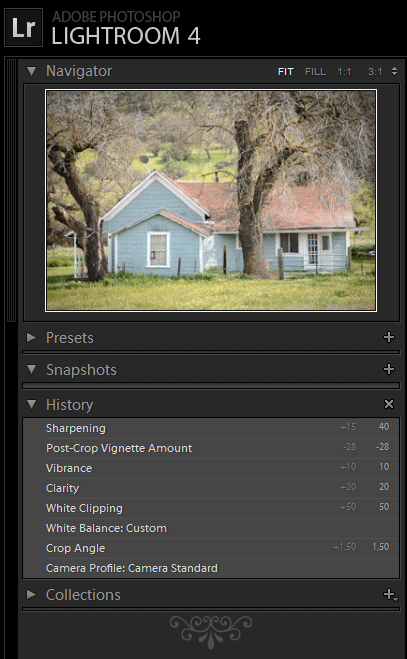
I haven't executed it as well as I would if I had more time, especially the colour treatment, but here goes. ![]() ![]() ![]() The process: Import to LR4 with Camera Neutral and sharpening to 60, 1, 80 and 30 (the file is soft). NR off altogether (with D800 sized files, NR is achieved by looking at the file at 50%!) Lens correction at defaults. Straighten. WB 5200 +17 Exposure -0.1 Contrast +20 Black -11 Shadow -34 Clarity +22 Yellow Luminance -20 Green Luminance -20 Green Saturation +20 > Photoshop for cloning out of telegraph wire, yard junk right and OOF pole notice left. > LR for... Paint on an extreme balance of WB shifts with a local brush on the paintwork to change its colour. Then paint on some selective desaturation to some of the white frames and posts to compensate. Looked a bit flat so Green Luminance -67 Green Saturation +58 (might as well be cheesy if I'm going all out!) -39 post-crop vignette Contrast +19 Whites +27 Forgive me, everyone, for my multiple sins... |
|
|
|
|
|
#45 |
|
Contributing Editor
Join Date: Dec 2009
Location: Germany
Posts: 3,687
|
Re: Processing Challenge: Nikon D800 file
UK meets California :-). I propose a paint job to match your processing.
__________________
Uwe Steinmueller ------------------- Editor&Owner of Digital Outback Photo http://www.outbackphoto.com |
|
|
|
|
|
#47 |
|
Subscriber Member
Join Date: Jan 2008
Location: South of England
Posts: 1,814
|
Re: Processing Challenge: Nikon D800 file
|
|
|
|
|
|
#48 |
|
Contributing Editor
Join Date: Dec 2009
Location: Germany
Posts: 3,687
|
Re: Processing Challenge: Nikon D800 file
>I took their satellite dish away.
Bad, there is no cable :-)
__________________
Uwe Steinmueller ------------------- Editor&Owner of Digital Outback Photo http://www.outbackphoto.com |
|
|
|
|
|
#49 |
|
Subscriber Member
Join Date: Jan 2008
Location: South of England
Posts: 1,814
|
Re: Processing Challenge: Nikon D800 file
|
|
|
|
![]() |
| Thread Tools | |
| Display Modes | |
|
|